 |
| Have a wonderful 4th of July! |

Thursday, July 4, 2013
Tuesday, June 18, 2013
New Video - Mobile Website Wedding Template
Wedding Website Template
Video, Desktop and Mobile Website Template
Cost: Free with a Standard AccountGenre: Wedding / Event
Colors: Green, Blue, White
 |
| Click to try the Wedding Website Template |
- Home / Index
- Reception
- RSVP Form
- Mobile Home
- Mobile Reception
- Mobile RSVP
Take some of the stress out of planning for your wedding by using our smart Video Website Wizard to build your website. Easily update the simple, yet fresh template to fit your needs. The RSVP page makes this website especially helpful as it allows your guests to RSVP online or via their smart phone.
Suggested Pages: Ceremony, Gift Registry, Directions Page
 |
| We suggest adding a map to your reception location. You can do so by pasting the map code into the website using the Raw HTML Bizit located in the Bizit Library. |
.jpg) |
| With this mobile RSVP form your guests can RSVP from their phone. |

Monday, June 17, 2013
Updating Your Wizard Domain to your private Domain
Setting up your Domain using your DNS host and the Wizard.
There are 2 parts to setting up your
domain.
Part 1, your Bizideo Wizard
- Log into your account
- Click “settings”
- Paste or type in your domain and click “save”

You should enter your domain in completion, so don't forget to include the .com,.tv or .org.
- Click “publish”
Part 2, setting up your Domain Record
- Log into your domain host
- Locate the DNS Records, Edit Records, Zone Editor or Zone Manager
- Locate your domain @ record
- Paste in this IP address “184.106.181.247”

Your Zone records may look differently. Just remember the only setting you need to fix is the @ record.
- Click “apply”, “save” or “set”
Do not change any of your other
settings; you only need to redirect your domain. Your domain host
should have all your other elements set up as your account needs, if
not you will need to contact your domain host to get your settings
set the way you like.
If you can’t find where to update
your domain settings please contact your domain host for assistance. It can take
up to 24 hours for your DNS to update, after 24 hours
please try visiting your domain address again.
If your Wizard does
not show up please attempt the following:
- Clear your cache
- Contact us at Support@Bizideo.tv and we’ll be happy to see what might be happening.
Wednesday, June 12, 2013
Want to make a stunning website, but lack programming skills?
Experience the Bizideo Website Wizard
All the multimedia/cross platform power and none of that programming stuff.
Try our Video Website Wizard today to see how you can easily build a powerful video, desktop and mobile site without the coding headache. Try it for free without logging in or registering!
Headache Free Plan Includes
Headache Free Plan Includes
 |
| Made in the Wizard, and available as an included template. |
 |
| Made in the Bizideo Wizard and included as a template. |
Tuesday, June 11, 2013
3 Ways To Make Video Work For You
3 Ways To Make Video Work For You
 |
| Using Bizideo you can add Video Testimonials, Video Instructions and Video Introductions to reach future customers. |
Just having a website is no longer
enough to stand out from your competitors, now the quality and
content of your website are what can mean the difference between
getting that first contact from a potential customer or not. Video is
a great way to help reach future customers with a information, they
can watch it on their desktop or their mobile device and don't have
to filter through all your site text to reach what you want them to.
Here are some quick video use tips for those of you looking to spice
up your website.
Video Testimonials
Testimonials are always a wonderful way
to show your quality as a service or product provider. It allows
those looking for your solution to see how you've helped others and
therefor how you might be able to help them. Video testimonials take
it to the next level, allowing them to put a face to the person
leaving praise on your website.
Video Instructions
From putting together a dresser to
installing new software, video can be a welcome guide through any
process. It takes the guess work out of whether or not you are
reading something correctly, and gives users a pause-able visual walk
through.
Video Introduction
The next best thing to meeting every
potential customer in person to describe your product or services is
to do it by video. They can see your face, and hear your message.
Even better you can include visuals to help explain what's going on.
Taking communication to the next level.
Tuesday, May 21, 2013
5 Tips for Making Mobile Friendly Pages
5 Tips for Making Mobile Friendly Pages
 |
| Remember you can make your mobile pages in the Wizard with no programming knowledge required. |
- Keep the navigation simple for touch devices.
- You can have drop down menus but remember that users will be using their fingers to navigate your website.
- Limit the amount of non-text on your pages.
- While most users should have decent download speeds some are still very slow to load pages. If your page takes too long users might choose to close the loading window rather than wait.
- Upload optimized images.
- While the Wizard can re-size your images we highly suggest uploading a shrunken and optimized version of your images for mobile to keep the load time down.
- Use video to keep your page interesting.
- The Wizard encodes a version of any video uploaded to be mobile friendly and knows when to deliver it. You don't have to worry about video crippling your website.
- Keep the width 320 pixels or under.
- It may look small while you work on it, but after you publish it go ahead and try it out on your phone. You'll notice that it's size should fit nicely, you may be tempted to make it wider but depending on the phone that will either shrink the page to fit or just cut it off.
Learn More Today
Thursday, April 25, 2013
Creating a Better Password
Helpful Password Tips
It’s surprising how many people on the web will use 1
password for everything, or will use rather weak passwords for high security systems.
To help with the creative challenge of coming up with a password you’ll
remember, but that isn't “123password”, here are some tips.

- Never use “password” in your password
- Use capitalized and lowercase letters (A = capitalized, a = lowercase)
- Use at least 1 number in your password
- Never use your name as your password
- Be sure to set your password reminder!
- Try combining some of your favorite things
Ex:
Your favorite food + your favorite number + your favorite author + the number
of times you’ve left the country (You don’t have to use this formula just know
what the formula is and use that as the password reminder)
If all else fails don’t be afraid of using a generated password
protected by a password tool. We like to suggest to our users LastPass. It’s
free, highly reviewed, and works great. (https://lastpass.com/)
However like with any decision you should research your options. There can be a
lot of benefit to using a password vault, especially if you have a lot of
accounts however in the end the decision is yours.
Monday, April 22, 2013
Tips and Why Training Videos for New Employees is a Great Investment
 |
| Training new employees is important but can also be time consuming. |
Training Videos for Team Members
Nothing can be more hectic than
trying to train a new employee when things are busy. (This generally seems like the best time to hire a new employee.)
You don’t want your new team member to be under-trained and confused or
frustrated but you also need to get your other responsibilities done. For
situations like this planning ahead can save you a lot of time and frustration
when it comes to training new staff. With a little foresight you can create
training videos on how to use different software that they might use, how to
handle customers, where to go to update their benefits and things that you know
will come up.
Don’t have time for creating training materials ahead of time? Not an
issue, as you are training hook up a microphone and turn on a screen capturing
device and make a video as you walk through. This gives your team member the
ability to review this video if they have questions.
Some Tips for Training Videos for New Employees
 |
| Make sure your employees feel comfortable in their new position. |
- Using the Bizideo Wizard you can make password protected pages and customize it with the videos and content that particular employee might need. This is a very inexpensive method and allows easy customization by non IT staff.
- Don’t forget that mobile training is an option! Both the Bizideo Wizard and the Enterprise are cross compatible, allowing users to check up on questions on the go.
- Save your video files so you can update it as you get feedback about things or as the protocol might change. (If the changes aren’t too drastic)
- Using the Bizideo Enterprise Solution system we can help deliver training to larger populations of users using our subscription system. You can easily make sure that all your General Managers get access to one subscription while all your Cart Attendants have access to another.
- The Enterprise also has ways to track user activity, and verify that they have completed viewing or downloading content. This solution can help train new employees BEFORE they show up to their first day of work or after hours as needed.
- Don’t just leave your new team member abandoned in front of videos. Remember that you’ll want to create a working relationship that needs to be interactive, so check in ask if they have any other questions regarding the materials.
- If you can dedicate time to making content beforehand it can be well worth it. On a quiet day you can spend a couple hours making materials that can make training multiple new employees a lot easier.
Fancy Learning More?
- More about the Targeted Bizideo Enterprise Delivery Solutions
- More about Bizideo’s Cross Platform Solutions
- View Examples
- Contact Us to Learn More, Schedule a Demo
Monday, April 15, 2013
How to Add Closed Caption to Your Online Video
Closed Caption Delivery
What Plans Include Closed Caption?
Loading player...
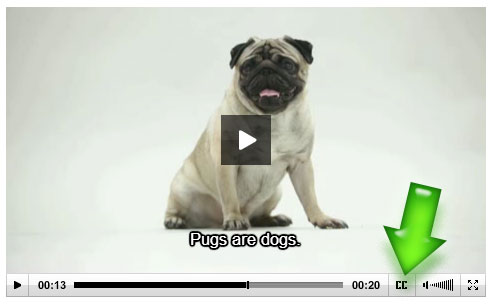 |
| Closed Caption is a wonderful tool and can be easily added to your published videos. |
How Does Closed Caption Work?
After you publish a video you can upload an SRT file, which
will allow the Closed Caption option to appear on the player.
- Head over to Playlists
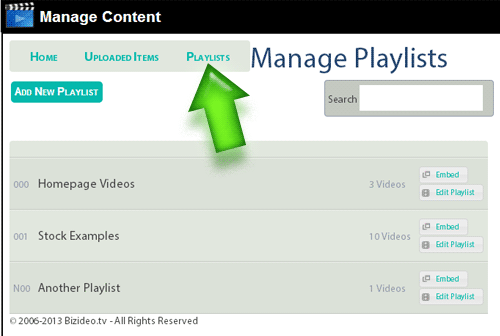 |
| Playlists can be found in your Content or Video Manager |
- Find the video you want to add the file to & click the "scroll" icon
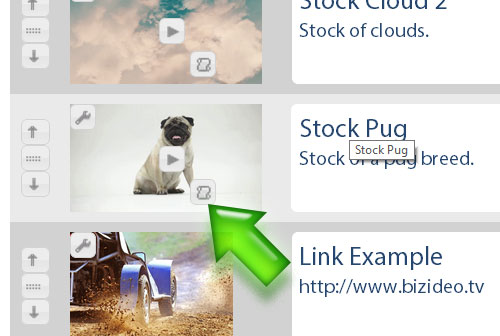 |
| This published video was inside a Playlist |
- Select and upload the SRT file
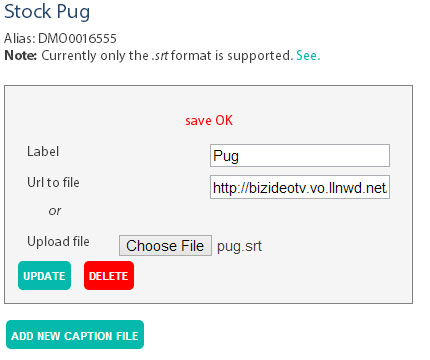 |
| You can also replace/update or delete your SRT file here |
Supported Formats
Our player, by default, handles SRT files. If you need support
for an additional format we can make arrangements. Please contact us at Info@Bizideo.tv to learn more.
How to Create an SRT
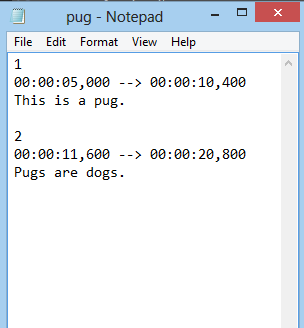 |
| You will notice that you number the appearance of a line, include a time code and the text to appear. |
- An SRT file can be created by using your Notepad tool.
- Save as a .SRT
- File must be UTF-8 format.
- Learn more about the .SRT Format http://en.wikipedia.org/wiki/SubRip.
Subscribe to:
Posts (Atom)